

Overview
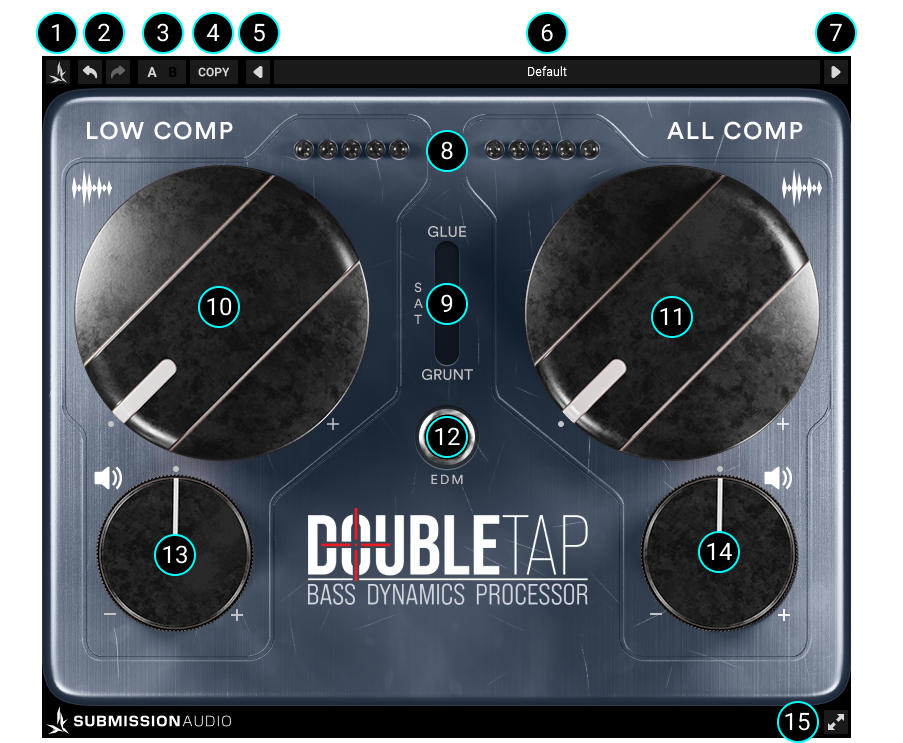
( 1 ) Menu
The menu allows you to:
- Show/Hide helpful tooltips for the major UI elements.
- Read the manual.
- Visit the official SubMission Audio website.
- Connect with our community on the official SubMission Audio Facebook group.
- Contact support directly.
- See the version of DoubleTap you have installed.
( 2 ) Undo/Redo
These function as standard Undo & Redo tools, incrementally undoing or redoing each stepped change made with the controls.
( 3 ) A/B
The A/B modes allow switching between two different 'sets' of the UI – allowing easy, instant comparison of two different setups, or presets.
( 4 ) A/B Copy
Copies the plugin settings of the currently active Mode to the other inactive mode.
( 5 ) Previous Preset
Toggle left through your presets.
( 6 ) Preset Menu
The preset menu contains all the User presets stored for DoubleTap.
( 7 ) Next Preset
Toggle right through your presets.
( 8 ) Gain Reduction LED's
Current gain reduction. This meter is scalable, and will vary between both compressors, as well as changing again in EDM mode. It is scaled to show the user the ideal gain reduction range to be operating in for each compressor.
( 9 ) Saturation
'Off' = No additional saturation.
'Glue' = Subtle console-like soft saturation gluing effect, based on Flatline's
waveshaper.
'Grunt' = Our favourite bass saturation algorithm, tweaked and refined to perfection. Adds
aggressive parallel saturation to give the bass more presence in the mix.
( 10 ) Low Comp
Low Frequency Compressor: A purpose-built bass guitar low frequency compressor. Begin here first to control the low-frequency content in your bass tone. Use the corresponding gain reduction lights in order to set the ideal amount of compression.
( 11 ) All Comp
Broadband Frequency Compressor: A general-purpose compressor, dialed specifically to add the finishing touch to your bass sound. Use this to tighten up the entire frequency spectrum, after first setting the Low Comp level.
( 12 ) EDM Mode
Alters under-the-hood parameters of DoubleTap to more closely suit it to processing electronic bass synths. The All Comp becomes viable across a greater reduction range, and the Grunt saturation becomes far more aggressive - bordering on overdrive.
( 13 ) Low Gain
Low frequency output volume. Use this to balance the low frequencies back into alignment with the rest of the signal after using the Low Comp.
( 14 ) All Gain
Overall output volume.
( 15 ) Resize
Determines how large the UI appears on the display.