

Introduction
Welcome to the PreFire user manual. PreFire is a powerful neural network-based microphone preamp simulator, bringing the rich analog tone of 11 legendary microphone preamps to your digital workflow. Using cutting-edge neural network technology, PreFire captures not just the sound but the unique character and harmonic saturation of each preamp across its entire gain range.
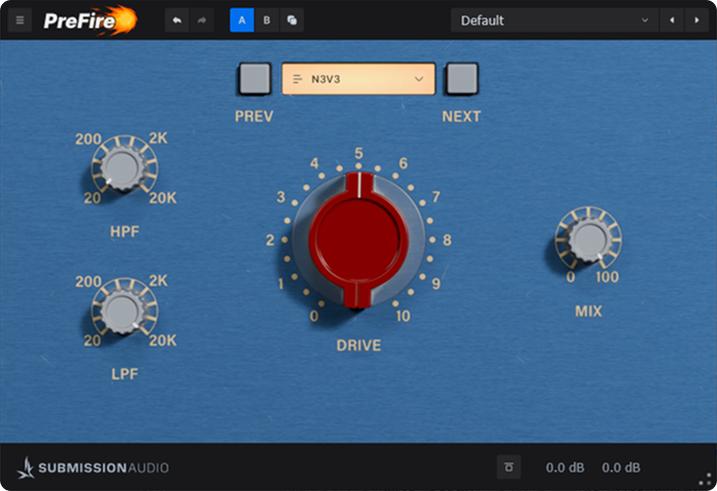
For over 30 years, studio engineers and producers adopting a digital workflow have looked to recapture the analog magic we left behind in the days of large format analog consoles. With PreFire, that analog warmth and character is now at your fingertips. Unlike traditional component-modeling approaches that sacrifice accuracy for CPU efficiency, PreFire uses advanced neural networks to capture every little unique detail which makes these preamps truly special.
Key Features
- 11 legendary microphone preamp models, each with their unique sonic character
- Advanced neural network modeling capturing the full range of analog behavior
- Intuitive Drive control that takes you from subtle enhancement to full saturation
- High-pass and low-pass filters for frequency-focused processing
- Parallel processing with dry/wet Mix control
- Zero-latency operation for seamless integration in your workflow
- Extraordinarily light on CPU despite the complex modeling
- Factory presets for common applications across various instruments and genres
Installation
System Requirements
- Windows: Windows 10 or later, 64-bit, VST3, or AAX host
- macOS: macOS 10.13 or later, 64-bit AU, VST3, or AAX host
- RAM: 4 GB minimum (8 GB recommended)
- CPU: Intel Core i5 / AMD Ryzen 5 or equivalent, Apple M1 or better
- Disk Space: 500 MB available
Installation Process
- Download the installer from your SubMission Audio account or from the email sent after purchase
- Close all DAW applications before installing
- Run the installer and follow the on-screen instructions
- Complete the installation process
- Launch your DAW and scan for new plugins (if required)
Activation
PreFire uses a simple one-time activation process:
- When first launching the plugin, you'll be prompted for your license key
- Enter the license key that was emailed to you after purchase
- Click "Activate" to complete the process
Note: An internet connection is required for activation.
UI Overview
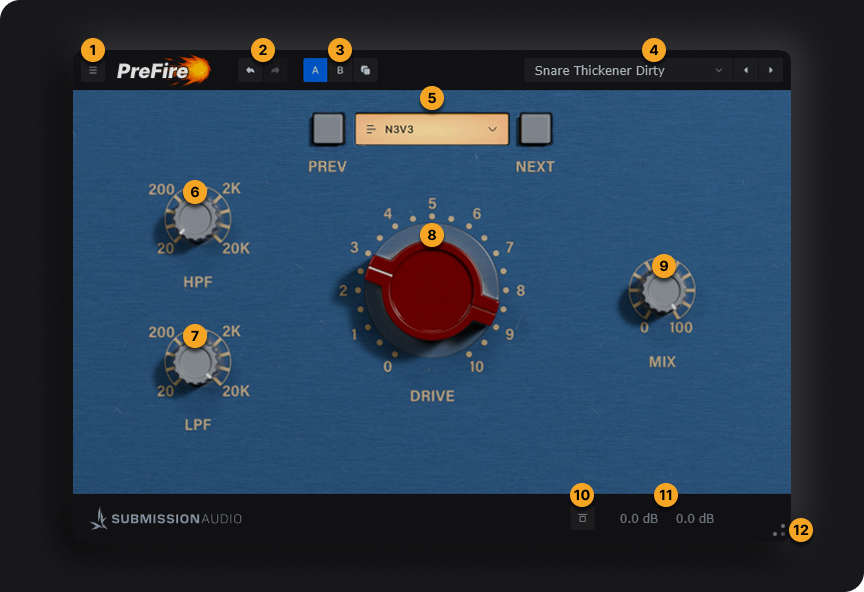
The PreFire interface is designed with a "less is more" philosophy, giving you all the power you need with minimal complexity:
Header
Enable/disable control tooltips.
Find plugin version info and useful links here.
Undo and Redo recent changes to plugin parameters.
Toggle between A and B states. Use the Copy State button to copy the current state into the other.
Use the dropdown menu top browse presets and related settings. Use the navigation arrows to iterate through the list of presets.
Main Controls
Choose from 11 legendary microphone preamp models, each with its own unique sonic character. Simply click on the preamp name to select it. See the Preamp Models section for detailed information about each model.
A gentle high-pass filter that allows you to focus the saturation effect on higher frequencies. Especially useful when you want to add high-frequency presence and detail without affecting the low-end. Can be combined with the Low-Pass Filter for band-limited effects.
A gentle low-pass filter that allows you to focus the saturation effect on lower frequencies. Useful for adding warmth and body without affecting the clarity of high frequencies. When combined with the High-Pass Filter, you can create telephone or radio-style effects.
The heart of PreFire. This control takes you through the entire range of tonal coloration the selected preamp offers - from subtle enhancement, through pleasant saturation, and ultimately to overdrive as the circuitry is taken beyond its intended spec. Listen for the moment the circuitry overloads and starts to 'bend' the signal, creating a rich harmonic texture that traditional models can't capture.
Blends between the unprocessed (dry) and processed (wet) signals. Allows for parallel processing techniques where you can combine the clarity of the original signal with the character and texture of the saturated signal.
Footer
Toggles the processing on or off. When bypassed, the signal passes through unaffected, allowing for easy before/after comparisons.
Adjusts the input and output level of the signal going through the preamp. Use this to 'bias' the preamp.
Click and drag to resize the plugin window to your prefered dimensions.
Preamp Models
PreFire includes a suite of 11 legendary studio preamps, hand-selected for their unique tone and ability to bring something special to your music.
The AP1 is a staple of rock and pop productions. With its fast transient response and discrete solid-state topology, it's known for its punchy and forward sound. The transformer-coupled input adds loads of harmonic richness and saturation, which can be tailored to the user's needs.
Perfect for aggressive vocals, guitars and drums.
A faithful recreation of the beloved N3V3 microphone preamp, the B43 comes packed with Carnhill transformers and Class A circuitry, providing the distinctive creamy midrange tone that defined so many classic records.
The B43 adds instant weight and polish. It thickens thin sources and rounds off harsh transients without dulling the signal. Think vocals, acoustic guitars, piano—anything needing richness and cohesion.
Featuring a very clean but musical signal path, the FOCUS is packed with revered Lundahl input transformers.
Unlike the dirtier models, this preamp is known for its subtle but euphonic qualities. Best used to add a sense of air and presence to tracks, or glue them together. It works fantastically in any situation where you need a special something to push your mix over the line.
A discrete, solid state mic preamp designed by an industry legend. The GEMEL is one of the cleanest, most pristine preamps in PreFire's line-up.
Perfectly suited for high-fidelity applications, such as mastering or adding glue to your mix bus. It can also be used to increase the richness and presence of just about any track, whether it be percussion, orchestration, synths or guitars.
A colour-sculpting beast built around vintage Germanium transformers, this preamp thrives on character, harmonic richness, and saturation, making it a go-to for engineers seeking mojo and attitude right at the input stage.
Whether you're tracking vocals, drums, or synths - it makes things sound bold, nasty, and expensive.
Derived from a legendary live console, this mic preamp is widely respected for its punchy, musical sound with a tight, focused low end and smooth but assertive top. Think of it as a preamp built for presence and clarity in complex mixes.
Ideal for drums, vocals, guitars - when you want the source to jump out of the speakers. The transformer input helps add weight and vibe, while staying clean under pressure.
The MILLENIUM is a preamp widely renowned for its transparency, and beloved for recording classical ensembles. Highly regarded for its precision and ultra-low distortion, it's often considered one of the most transparent preamps available.
Absolutely ideal for creating a greater sense of presence and thickness on drums, bass, and even the mix bus itself without any outward signs of coloration. The MILLENIUM is renowned for making any track sound immediately more dimensional and 'expensive'.
One of the most iconic microphone preamps in history, the N3V3 colour is now a thing of legend. Based on a design created in the early 1970s, it's coupled to a Class A transformer. It's renowned for its rich, harmonically complex sound, delivering a bold, musical tone that enhances almost any source.
It's not transparent - and that's the point. The N3V3 is for when you want vibe, character, and mix-ready sound right at the input stage. It makes good sources sound great, and great sources sound iconic.
The TIGI is a transformer-balanced, Class A microphone preamp with a discrete circuit path and some modern enhancements, while staying true to the tone of the console it's derived from. This preamp saw heavy use in the creation of some of the most iconic pop and rock records in history.
It delivers a thick, punchy, colorful tone - not unlike a N3V3, but with more top-end excitement and a slightly more aggressive, forward character. The TIGI is a go-to for rock vocals, electric guitars, drums, and even synths that need to pop.
A tube preamp, taken from a console favoured by legendary singers of old. The UNIVERSE is rich, round and warm - perfect for vocals. When everything else feels too shrill and forward, this preamp is often the solution to nestle a vocal track neatly into your mix.
Featuring a brilliant, creamy midrange tone that is unlike any other in the PreFire line-up. It's easy to see why this preamp was favoured by iconic singers looking for a warm, intimate sound.
As the name might suggest, the VBOX is a preamp designed specifically for vocals. As one of our two tube preamps, it provides a unique, rich character that is quite unlike any other.
Whether you're looking to add weight to a thin microphone, or even density to your bass guitar, the VBOX can often provide that perfect fit, unlike any other. It's classy, it's refined, and it's smooth as all hell.
Advanced Techniques
Vocal Enhancement
PreFire excels at enhancing vocals, allowing you to add character, warmth, and presence that digital recordings often lack.
Modern Vocal Processing
- Try the VBOX or UNIVERSE preamp models, which are specifically designed for vocal enhancement
- Start with moderate Drive settings (30-40%) to add warmth without obvious distortion
- Use the High-Pass Filter (around 100Hz) to prevent low-end buildup
- Adjust Mix to taste (70-80%) to maintain clarity while adding character
- For more presence, try the AP1 or TIGI models with slightly higher Drive settings
Vintage Vocal Treatment
- Select the N3V3 or UNIVERSE preamp for that classic analog warmth
- Push Drive settings higher (50-70%) to get into the sweet spot of harmonics
- Use both High-Pass and Low-Pass filters to create a focused midrange (200Hz to 8kHz)
- Consider lower Mix settings (50-60%) to blend the vintage character with the original clarity
Drum Enhancement
PreFire can add the punch, character, and life to drums that engineers have sought from analog gear for decades.
Kick Drum Processing
- The MIDA or AP1 preamps are excellent choices for kick drum, providing punch and definition
- Use moderate Drive (40-60%) to enhance the body and attack
- Consider using the High-Pass Filter (around 30-40Hz) to control sub frequencies
- For more beater click, use the TIGI preamp with higher Drive settings (60-70%)
Snare Drum Enhancement
- The AP1 or GERMANIUM models excel at adding snap and presence to snares
- Higher Drive settings (50-70%) can add exciting crack and attitude
- Try using the High-Pass Filter (around 100-200Hz) to focus on the snap rather than the body
- For vintage snare character, the N3V3 model at 40-60% Drive delivers classic tone
Bass Guitar Applications
PreFire's neural network technology excels at capturing the harmonic richness that gives bass its life and presence in a mix.
Adding Weight and Definition
- The B43 or N3V3 models are excellent for adding weight to bass guitar
- Use moderate Drive settings (30-50%) to enhance the fundamental without losing definition
- For finger-style bass, try the VBOX with a High-Pass Filter (around 60-80Hz) to control muddiness
- Use Mix control (60-80%) to maintain transient clarity while adding body
Aggressive Bass Tone
- The GERMANIUM or AP1 models excel at adding grit and presence to bass
- Push Drive settings higher (60-80%) for more aggressive harmonic content
- Keep Mix around 50-70% to blend the aggressive tone with the clean signal
- For slap bass techniques, the MIDA offers excellent transient response and clarity
Mix Bus Applications
PreFire can add cohesion and character to your entire mix when used subtly.
Adding Analog Warmth to a Mix
- The FOCUS, GEMEL, or MILLENIUM models are perfect for subtle mix bus enhancement
- Use very low Drive settings (10-30%) for gentle harmonic enhancement
- Keep Mix low (20-40%) to maintain the clarity of your original mix
- Always A/B test with the Bypass function to ensure you're not losing important mix elements
Creative Effects
Beyond traditional applications, PreFire can be used for creative effects:
Radio/Telephone Effects
- Select the GERMANIUM or TIGI preamp for character
- Use both High-Pass (800Hz-1kHz) and Low-Pass (2.5-3kHz) filters to create a band-limited effect
- Push Drive settings high (70-90%) for obvious distortion
- For authentic vintage radio sounds, try the N3V3 model with similar settings
Extreme Distortion
- The GERMANIUM model with Drive maxed out (90-100%) creates rich, aggressive distortion
- For thick, tube-like overdrive, the UNIVERSE or VBOX at maximum Drive settings shine
- Use Mix control to blend in some of the clean signal for clarity and definition
- Experiment with different preamp models at extreme Drive settings for unique distortion characters
Support
Contact Information
If you have any questions or need assistance with PreFire, please contact our support team:
- Contact: https://www.submissionaudio.com/pages/support
- Support Portal: https://support.submissionaudio.com